Writink: A Bold Handwritten Font for Web Design
Working on a new website for a boutique online store, I was looking for a font that could bring a personal touch to the brand without sacrificing clarity. Writink caught my eye—it’s a handwritten font with a bold ink style that feels both natural and strong. It’s not just another script font; it has a personality that fits well in digital layouts where creativity meets functionality.
Testing Writink in the hero section of the site, I immediately noticed how it stood out against the clean, minimal background. The characters have a hand-drawn quality that adds warmth, making the design feel more approachable. It wasn’t too ornate or difficult to read, which is a big win for a font that’s meant to be used in headings and banners.
Visual Characteristics and Digital Appeal
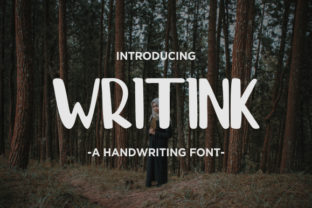
Writink has a distinct visual identity. Its strokes are thick and confident, giving it a bold presence that works well for headlines and call-to-action buttons. The font’s structure isn’t too loose, so it maintains a sense of control even when used in larger sizes. This makes it ideal for websites that want to communicate energy and authenticity without overwhelming the reader.
The font’s handwritten look gives it a unique charm, especially when paired with images or textures. On a product landing page, for example, using Writink for the main title over a background image created a striking contrast that drew attention without being distracting. It felt like an invitation to explore the content rather than a barrier to it.
Practical Use Cases for Writink
As a web designer, I often think about how a font can support different parts of a layout. Writink excels in headers, section titles, and decorative elements. It’s less suited for body text but works perfectly as a display font. For instance, on a coaching website, using Writink for the headline of a course sales page added a personal, human touch that resonated with visitors.
In a creative portfolio, Writink helped set the tone for the designer’s work. Placing it over a subtle gradient background made the site feel more dynamic. It also worked well for short phrases, like “About Me” or “Contact,” where a bit of flair could enhance the visual storytelling without compromising readability.
Readability and User Experience
One of the first things I checked was how Writink performed on mobile screens. At smaller sizes, the font remained legible, though I found that using it for body text wasn’t ideal. It’s best reserved for short, impactful phrases where its character can shine.
On dark backgrounds, Writink retained enough contrast to be readable, but I preferred using it on light or neutral tones for maximum clarity. When placed over images, I made sure there was enough white space around it so the text didn’t get lost in the visuals. This is important for maintaining user engagement and ensuring the message is clear.
Font Pairing and Brand Consistency
When working on a digital brand kit, I paired Writink with a simple sans serif font for body copy. This combination gave the site a balanced look—Writink provided a strong visual anchor, while the sans serif kept the rest of the content easy to scan. It’s a common strategy in web design to use a decorative display font alongside a more functional typeface.
For editorial-style sites, pairing Writink with a serif font could add a more traditional, thoughtful vibe. But for modern, tech-focused brands, a sans serif pairing might feel more cohesive. The key is to ensure that the font choices support the brand’s voice and the user’s experience.
Technical Considerations for Web Designers
Before implementing Writink on a live site, I always check for webfont availability, file formats, and licensing. Writink comes in multiple weights and styles, which is great for flexibility. It also supports multilingual characters, which is essential for global audiences.
For performance, I made sure to optimize the font loading by using web-safe fallbacks and lazy loading techniques. This helped keep the site fast, even when using a custom font. Writink’s file size was reasonable, so it didn’t add much overhead to the page load time.
As a digital product creator, I appreciate fonts that offer both aesthetic value and practicality. Writink delivers on both fronts. Whether it’s for a small business website, a course sales page, or a blog redesign, it brings a fresh, authentic look that aligns with modern design trends.
Using Writink in a project isn’t just about style—it’s about creating a stronger connection between the brand and its audience. Its bold, handwritten appeal adds a layer of personality that can make a website feel more human and memorable.
Overall, Writink is a versatile tool for web designers and digital creators who want to elevate their typography without sacrificing clarity. It’s a font that works well in the right context, and when used thoughtfully, it can help build a more engaging and professional online presence.
Whether you’re designing a landing page, a portfolio site, or a brand identity, Writink offers a unique way to express your vision through typography. It’s not just a font—it’s a design choice that can shape the way users interact with your digital space.